Daily Football Quiz: 10 Trivia Questions
Free interactive football puzzle game · Play in your browser
Test your football knowledge with ten daily trivia questions, from easy to hard. Use up to three attempts per question and build your Footalara Coach score.
Game guide
About Daily Football Quiz
Ten football questions, ordered from an opening warm-up to a tougher final question, make up each Madrid-day quiz.
How to play
Answer a fixed daily sequence of ten football questions. A question can ask for a player, a team or a multiple-choice answer. You normally have one try, with two Double try uses available across the quiz.
How a round works
- Read the prompt and check whether it asks for a player, a team or a multiple-choice answer.
- Before answering a difficult question, decide whether to activate one of your two Double try uses.
- Search the matching football name or select an offered option, then move on after the result.
- Work through all ten questions and compare your score with the next day's fresh set.
What the game checks
Search questions identify whether the answer is a player or team; other questions provide answer choices. The answer control follows that question's type.
Methodology
Questions are selected as a shared Madrid-date set and ordered by the stored difficulty value. The answer label and answer type are checked together so that a player question cannot silently accept a club, or vice versa.
Limitations
Football names can have accents, abbreviations and familiar short forms. Search helps locate the canonical answer, but the quiz does not treat every nickname or historical spelling as interchangeable. A rejected alias is not evidence that the underlying football fact is wrong.
Real game screen · Worked example
Worked example: identify the answer type and manage your tries
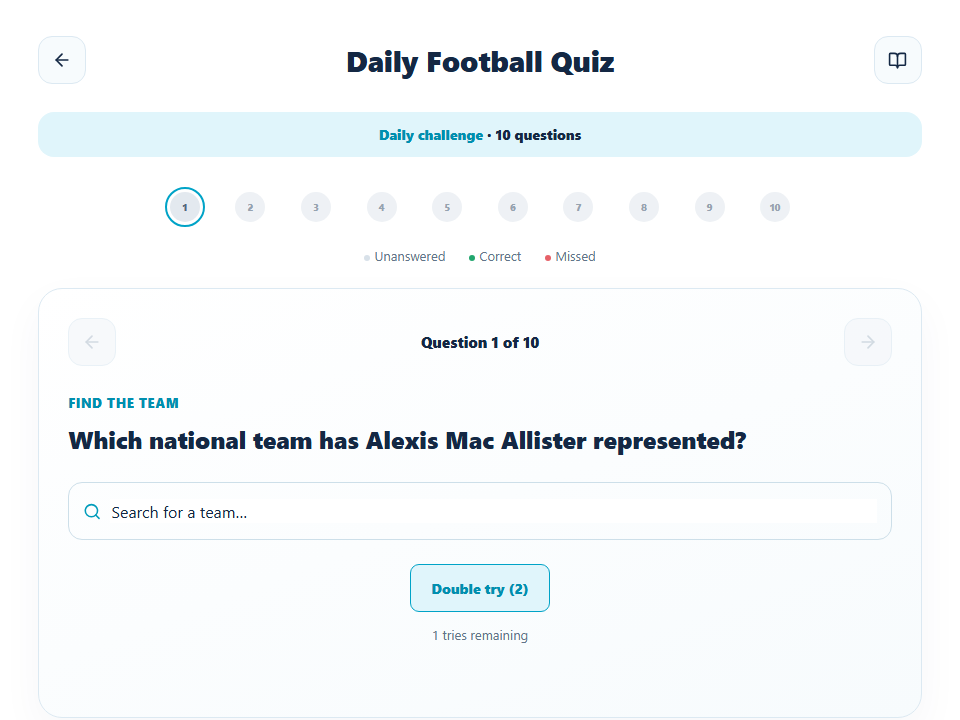
If a prompt names a player but asks for his national team, use team search. If you have two plausible answers, activate Double try before submitting the first one.
This screenshot asks for a national team and therefore shows 'Search for a team'. It also shows one try remaining by default and two Double try uses available across the quiz. Those details matter more than the temptation to rush: the question wording determines what you should search for, and Double try is a scarce resource to activate before answering.
1. Identify the expected kind of answer
Read the small label above the question as well as the sentence itself. 'Find the team' means the accepted answer comes from the team search, even when a famous footballer's name appears in the prompt. Other questions may request a player or offer A/B/C/D choices. Use the search or options shown for that specific question; do not type a player's name into a team question.
2. Decide whether this question needs insurance
Normally you have one attempt. The Double try control has two uses for the whole ten-question session. Activating it before you answer gives that question an extra attempt if the first answer is wrong. Save it for a question where you can narrow the answer to two realistic candidates; spending it on an obvious opening question gives away flexibility for the difficult end of the set.
3. Submit a canonical choice
Search the relevant player or team name and select the result that matches your intended answer. The search result helps resolve spelling, accents and similarly named entities. On a multiple-choice card, select the offered option instead. Read any feedback before moving on: it tells you whether the answer was correct or missed and prevents a mistaken memory from becoming your study note.
4. Use the progress strip deliberately
The ten numbered dots distinguish unanswered, correct and missed questions. After resolving one, advance with the right arrow; the left arrow can revisit answered questions where available. You do not need a perfect first half to finish the quiz. Continue through all ten so the full score reflects the whole set rather than one difficult prompt.
5. Review why you missed, not only what you missed
If the answer surprised you, identify the type of error: wrong answer category, an era mix-up, a similar club or a player whose national-team history you remembered incorrectly. That diagnosis tells you which Footalara guide to read next and is more reusable than memorising ten isolated labels.
Common mistakes
- Assuming every question allows three attempts; the current quiz starts with one.
- Activating Double try after answering, when it can no longer help that question.
- Searching for a player when the prompt requests a team.
What to remember: Read the answer type, make a conscious Double try decision, then use the ten-question progress strip to finish and review the whole set.
Corrections
If a prompt, answer type or accepted name is inaccurate, report the question wording and the date shown in the game. Footalara can correct the source record while preserving the rest of that day's ten-question sequence.
Tips
- Use the requested answer type to rule out the wrong category before searching.
- Keep the two Double try uses for uncertain questions, especially later in the set.
Questions
How many questions are in the daily quiz?
Each Daily Football Quiz has ten questions, ordered from difficulty 1 to 10.
How many attempts does each question allow?
A question starts with one attempt. You can activate Double try before answering to get a second attempt on that question; there are two uses per quiz.
When does the quiz change?
The shared daily set changes at midnight in Madrid.